728x90
ssh -p 22 test@192.168.100.200ssh로 우분투 접속
sudo vi /etc/systemd/system/temp.serviceservice 파일 생성
[Unit]
Description=Weather Collect Service
After=network.target

[Service]
Environment="JAVA_HOME=/usr/lib/jvm/java-11-openjdk-amd64"
WorkingDirectory=/home/test/
ExecStart=/bin/bash -c "exec java -jar temp.war"
#ExecStart=/bin/bash -c "exec java -jar -Dspring.profiles.active=dev temp.war"

Restart=on-abnormal
RestartSec=10

User=root
Group=root

[Install]
WantedBy=multi-user.target
경로설정, 저장
WorkingDirectory가 temp.war가 들어있는 폴더
Dspring.profiles.active= 는 war 내 .yml 선택용
//reload
systemctl daemon-reload

//service 활성화
systemctl enable temp

//server 실행
systemctl start temp

//server 상태확인
systemctl status temp
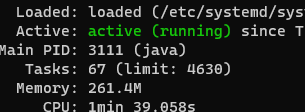
active running 성공
추가명령어
//server종료
systemctl stop tomcat
//service 비활성화
systemctl disable tomcat728x90
'OS (Operating System) > Linux' 카테고리의 다른 글
| 리눅스(Linux) IP주소 확인 (0) | 2022.06.23 |
|---|---|
| 리눅스 (Linux) 톰캣 리눅스 서버배포(우분투), Tomcat Ubuntu Server (0) | 2022.06.17 |
| 리눅스 (Linux) 리눅스 톰캣 서비스 등록, Tomcat Service Ubuntu (0) | 2022.06.17 |
| 리눅스 (Linux) 우분투에서 프로그램 삭제하는 법 (0) | 2022.06.17 |
| 리눅스 (Linus) ssh로 원격 연결 (VirtualBox 우분투) (0) | 2022.06.16 |

